Global Overview
An overall view of your SQL Server estate
The Global Overview dashboard is your entry point to the SQL Server infrastructure: it provides an at-a-glance view of all the instances, along with useful performance metrics.
Use the organization selector at the top of the dashboard to choose one or more organizations you can access. Select all accessible organizations to get a single-pane-of-glass view of their SQL Server estates.
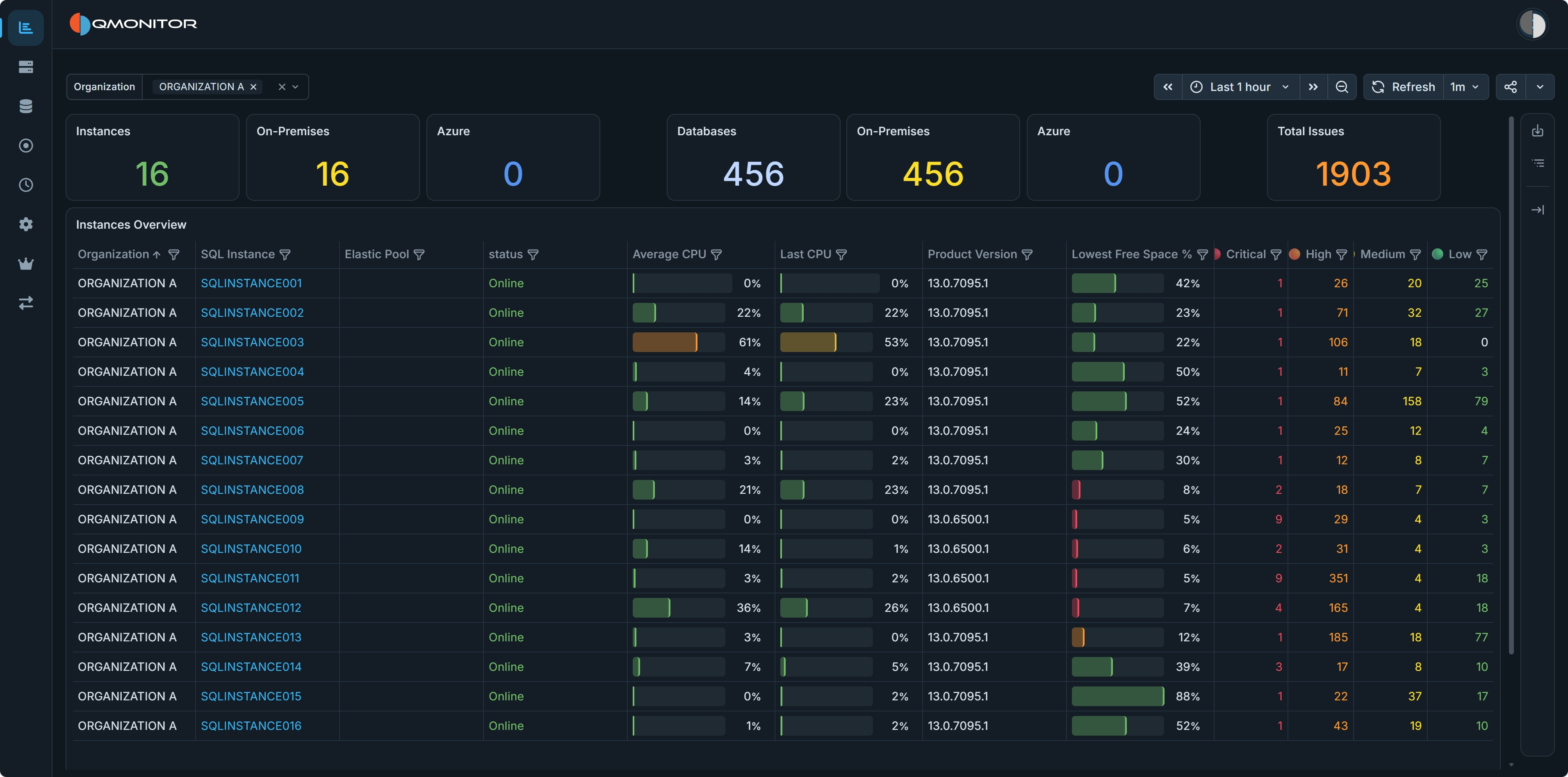 Global Overview dashboard showing instance KPIs and the instances table
Dashboard Sections
Instance and Database Counts
At the top of the dashboard, KPIs show the total number of monitored instances and databases, each divided between on-premises and Azure. The Total Issues KPI shows the total number of issues.
Instances Overview
The middle of the dashboard contains the Instances Overview table, with the following information:
- Organization: The organization that owns the instance.
- SQL Instance: The name of the instance. For on-premises SQL Servers, this corresponds to the name returned by @@SERVERNAME, except that
the backslash is replaced by a colon in named instances (you have SERVER:INSTANCE instead of SERVER\INSTANCE).
For Azure SQL Managed Instances and Azure SQL Databases, the name is the network name of the logical instance. Click on the instance name to open the Instance Overview dashboard for that instance. - Elastic Pool: for Azure SQL Databases, the name of the elastic pool if in use, <No Pool> otherwise.
- Status: the current status of the instance, such as Online, Offline or Disabled
- Last CPU: the last value captured for CPU usage in the selected time interval
- Average CPU: the average CPU usage in the time interval
- Product Version: the SQL Server product version.
- Lowest disk space %: the percent of free space left in the disk that has the least space available. For Azure SQL Databases and Azure SQL Managed Instances the percentage is calculated on the maximum space available for the current tier.
- Critical, High, Medium, Low: the number of issues at each severity level for the instance.